
LPA Feedback Redesign: Drive Efficiency and Uncover Opportunity
We’ve been busy delivering Loan Product Advisor® (LPA®) enhancements that help you do your job faster and easier, so you can provide the best borrower experience.
Hopefully you’ve seen and are already taking advantage of enhancements like:
- LPA Choice®: Helping you turn Cautions into Accepts through unprecedented, actionable feedback messaging.
- LPA check: Giving you an early look at whether a loan might receive an Accept or automated collateral evaluation (ACE) eligibility based on fewer data points.
- LPA 6.0 feedback redesign elements: Prioritizing actionable information, standardizing feedback messages and creating a better user experience.
- And more…

But we’re just getting started. You’ll now see even more impactful enhancements to the LPA feedback certificate for LPA 6.0. Some of these updates address your feedback and all of them amplify opportunities for your borrowers while helping you more quickly and easily get information to determine the best path forward for a loan. Here’s what you can expect:
New Caution and Opportunity Message Sections
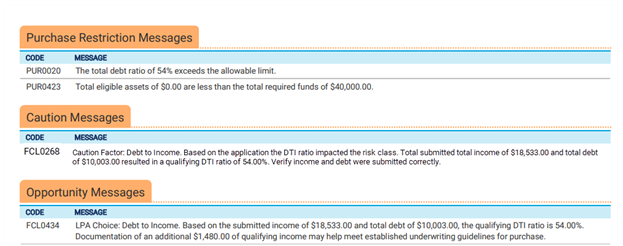
You’ll have clearer insight into factors that are causing a loan to receive a Caution risk class or potential missed opportunities for your borrowers.
- Important messages will appear at the top of the feedback certificate, immediately under the Purchase Restriction Messages section.
- The Caution Messages section will include messages explaining why the loan has a Caution risk class.
- The Opportunity Messages section will include messages delivered on Accept or Caution risk class loans – helping you identify situations where rent payment history or positive cash flow could benefit the borrower and LPA Choice messages to help you get to Accept and more.
New Employment & Income Grid
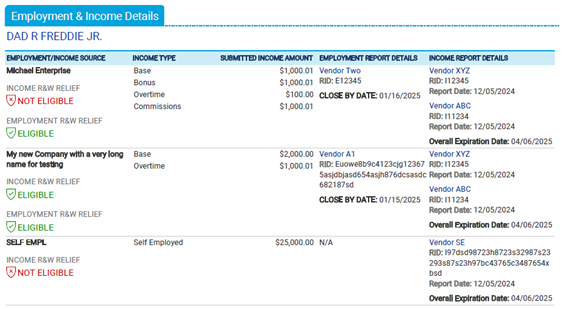
You’ll have a clearer look at income data submitted to LPA and eligibility for representation and warranty (R&W) relief.
- We're adding a new grid to distinguish between loans using asset and income modeler (AIM) and non-AIM loans that deliver information in a more easily digestible visual format.
- Whether using AIM or not, you’ll see the different income types used, the submitted income amounts, clearly stated Close By and Expiration Dates and income and/or employment R&W relief eligibility results.
- For loans using AIM you’ll also see AIM provider employment and income reports details (including the income report overall expiration date).
Enhanced Asset Details Grid
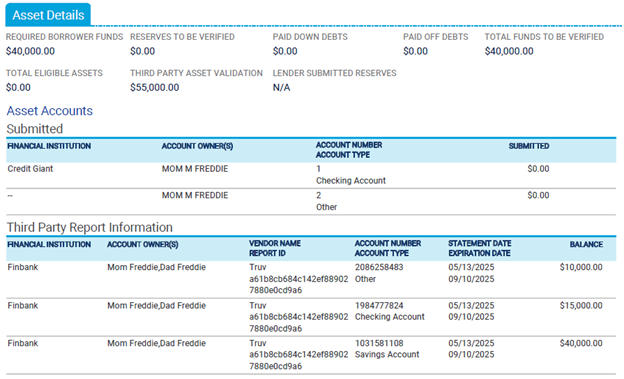
You’ll more easily identify assets by borrower and compare information submitted to LPA against information from third-party AIM provider reports.
- The Asset Details grid will include a table with information submitted to LPA.
- Now you can quickly identify whether the information you submitted matches the AIM provider report information.
- We've also grouped assets in these tables by borrower and removed a duplicate column.
Highlighting Actionable vs. Informational Messages
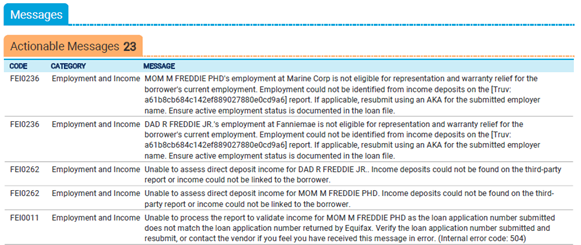
You’ll be able to identify and prioritize messages that offer actionable feedback. We’re splitting apart messages into “Actionable” and “Informational” categories on the feedback certificate so you can more quickly focus your efforts on actions you need to address.
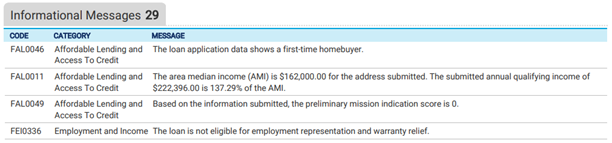
And if that’s not enough, we’re also helping you drive more efficient workflow by delivering on your requests to simplify feedback message language and remove unnecessary messages. As part of this effort, we’re streamlining almost 250 feedback messages and retiring nearly 500 more.
All of these new enhancements are now available. You can always find the latest LPA release information and feedback messages updates on our Releases webpage and access resources to get the most out of the LPA through our Freddie Mac Learning webpage.
Remember, you must be using LPA v6.0 in to take advantage of these enhancements. If you have questions about what version you’re using, contact your technology provider.
Subscription Center
Get and stay connected with Freddie Mac Single-Family. Subscribe to our emails and we'll send the information that you want straight to your email inbox.